Read time: 3 Min
Managing multiple email files becomes challenging when switching to another platform. If you have MBOX files and want to convert their data into different EML files, then it depends on choosing the right method. As we know MBOX file saves your complete mailbox data in a single file. For better email management and accessibility, users often convert MBOX to EML files.
Whether you are migrating your data or creating a backup, this guide will guide you to secure and efficient MBOX to EML conversion with complete data. Before that, let’s talk about the benefits of converting MBOX emails to EML files.
Why Convert MBOX Emails to EMl Files?
Various factors are favourable for MBOX to EML conversion, some of them include;
- EML files are supported by most of the email clients compared to MBOX.
- All the email clients support various formats as backup, thus conversion is needed for better accessibility.
- EML saves each email separately, thus small in size and easy to save.
- Large MBOX files can easily get corrupted, while separate EML files are safer.
Manually Convert MBOX to EML File
Manually, there are a few methods to export emails from MBOX file to EML format. However, these solutions offer limited conversion, such as
- You can convert a single email at a time.
- Need an MBOX-supportive email client to complete the conversion.
- While conversion there can be data loss, deleted attachments, etc.
Let’s discuss the solution one by one in detail. Here we will take the help of the Thunderbird client.
1. Use Thunderbird’s “Save feature.“
- Open the Mozilla Thunderbird program after downloading it.
- Configure your email account you are using.
- Now, import MBOX to Thunderbird using its “import” feature.
- Now, hold CTRL and use a left-click to pick certain emails that you wish to convert.
- Select emails that you want to save.
- Right-click on them and select “Save As”.
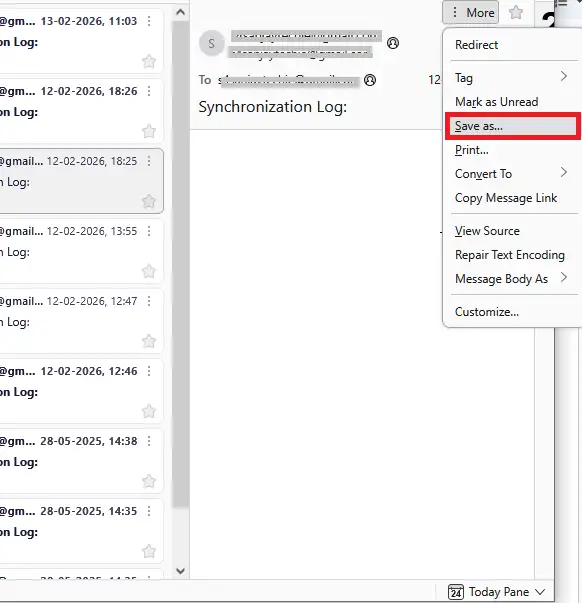
- One can save converted emails in the folder of choice.
- MBOX emails can be converted to EML files by clicking the Save button.
2. Export MBOX Emails to EML Using ImportExportTools NG
Thunderbird allows you to add the add-ins to import or export your mailbox data. Here are the steps for the MBOX to EML conversion.
- Start Thunderbird and add an email account.
- Select settings, choose Add-ons and themes.
- Find “ImportExportTool NG” in the search bar.
- Users can now click Add to Thunderbird to add the addon.
- Now close Thunderbird and start it up again.
- First, upload the MBOX file that you want to convert.
- Right-click on it once Thunderbird has resumed.
- Select “ImportExportTool NG“.
- Tap “Export all messages in the folder” and then select the” EML Format.”
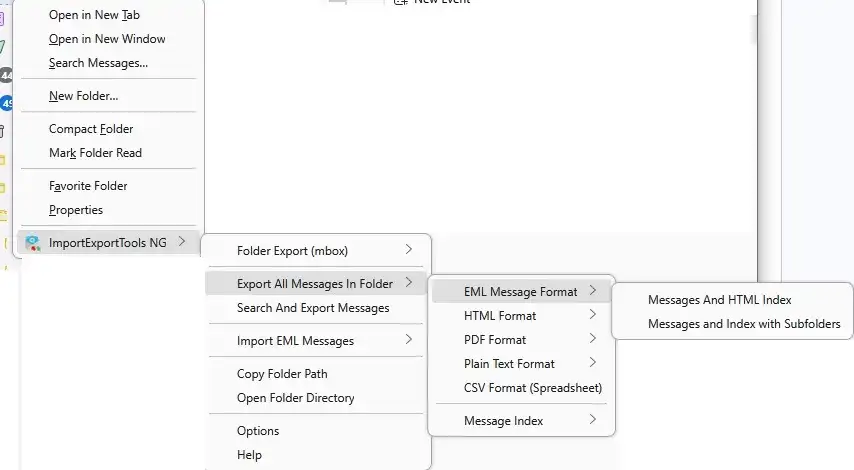
- The next step is to choose the folder in which to keep your converted emails.
- Start the conversion process by choosing the folder that needs to be converted.
3. Drag and Drop Method to Convert
- Open Thunderbird and click on the Import button.
- Now browse the MBOX file and upload it to Thunderbird.
- Open the imported MBOX folder.
- Select the emails you want to convert.
- Drag and drop them to a folder on your desktop.
- Each email will be saved as an individual .eml file.
Done! Here are the solutions to convert MBOX emails to EML files. However, manually, you can’t convert multiple MBOX files at once.
Direct Way to Import MBOX to EML in Bulk
With BLR MBOX Converter, you can easily complete the conversion in a few simple clicks. Also, you can convert emails from multiple MBOX files at once without any data loss. While converting this MBOX to PST Converter tool will maintain email key elements and attributes.

Also, using this tool, you can convert MBOX to EMLX for Mac users. The software offers options to import MBOX to Office 365, Yahoo Mail, Gmail, and all other webmail accounts. You can also use the demo version of the software to know how the tool works.
Conclusion
Both manual and expert methods to convert mbox files to eml/emlx or export mbox into EML format are covered in today’s blog. We discussed some simple techniques here today. The bulk of the manual method, however, includes the risk of data loss and corruption. We advise you to use the MBOX to EML converter as a result. The first 15 emails will be converted for free from MBOX to EML format.