BLR OST to PST Converter Tool
Convert OST to PST without Outlook
Convert orphaned, damaged, or inaccesible OST file to PST effortlessly. Export OST emails, contacts, calendars, journals, and other data to a PST file with accuracy and efficiency. With a user friendly interface, it is perfect for both professionals and beginners.
- Convert OST emails, contacts, calendars, tasks, etc, to PST format
- Export the corrupted or damaged OST emails to a healthy PST file
- Migrate OST emails to Gmail, Office 365, and various webmail accounts
- Convert a large OST file into smaller PST files without any data loss
- Support converting an encrypted OST file to PST without any hassle
- Support the conversion of OST file created with Outlook 2024, 2021, 2019, 2016 and all older versions
WHEN TO USE
BLR OST to PST Converter Software
When OST file is orphaned
If you have an OST file that you received or simply stored in your system as backup, then accessing it in Outlook is not possible. With the OST to PST conversion tool, users can convert not accessible OST file into PST in a few simple clicks.
Migrating OST to new Outlook
If you create a new Outlook profile and want to move your old data, then you can't use the old OST file. To transfer OST file to new Outlook, you first need to convert OST to PST file. It completes the conversion for you so that users can migrate their data to a new Outlook profile.
When Outlook is not installed
Even if you are not an Outlook user, or your Outlook profile has been deleted, the software helps youin it. This tool will convert OST to PST without Outlook, so that you can send or use it in other systems. Most importantly, there will be no data loss while converting your data.
EXPERT PERSPECTIVE
Expert Reviews for BLR OST to PST Converter
OST converter tool is capable to convert orphaned OST files to PST file format. At times OST file needs to be transferred to PST format. Download free demo version and install on Windows 11, 10, 8, 7 and below versions system.
Taylor Green from techpreview tested OST to PST converter tool in their environment. After using this software he marked it best and problem free utility, and rate it 9/10. Also, he recommends this software to the users for perfect and complete conversion.
STEP-BY-STEP GUIDE
How to Use BLR OST to PST Converter
Step 1: Download, install, & open the OST to PST converter software.
Step 2: Click on the Add File button and browse your OST file.
Step 3: Choose the email folder that you want to convert.
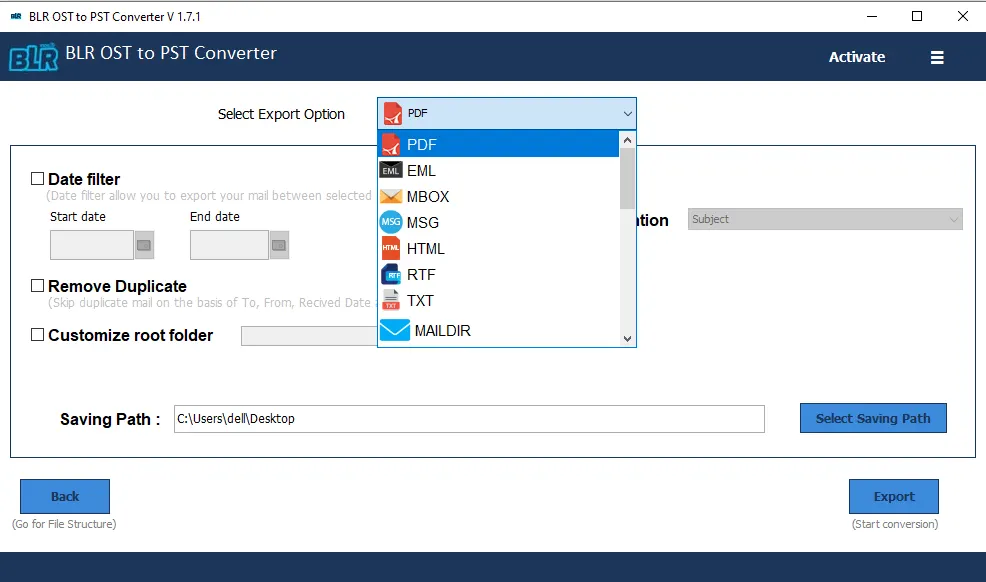
Step 4: There are various export options; choose PST or any other format.
Step 5: Browse the saving location and hit the Export button to start the process..
KEY FEATURES
Highlighted attribute of BLR OST to PST Converter
Extract OST Emails to PST
With the BLR OST to PST Converter Tool, it is easy to export OST file to PST with attachments. The software effortlessly extracts email, contacts, calendars, journals, tasks, and all other data from OST file to PST in a few simple clicks.
Convert OST file to Multiple Formats
Powerful OST Email Converter software enables users to convert emails from Outlook OST files into multiple email files for free. It will convert OST to PDF, EML, MSG, MBOX, and EMLX file formats with no data loss. Keep the attachments from the OST files as well.
Export Contacts from OST File
If you have an OST file and only want to export contacts from it, then this conversion tool will be helpful. With a few simple clicks, you can extract contacts from OST file without any hassle. Load the OST file and select the contact folder, then choose VCF as an export option.
Import OST to Multiple IMAP Accounts
An effective OST to PST Converter tool allows you to import OST files directly into your webmail accounts. It will effortlessly import OST to Office 365, Yahoo Mail, Hotmail, Thunderbird, Exchange Server Account, IMAP Server Account, AOL, OperaMail,HostGator Webmail, Yandex, and other services.
Ensures 100% Data Accuracy and Safety
OST Converter tool will preserve the authenticity of your data while converting it. It will keep all the email properties, including inline images, attachments, hyperlinks, meta data (To, From, Subject, Date). Also, convert OST email to PST and other formats without affecting the folder structure.
Split Large OST File in Smaller Parts
If you are dealing with a large OST file, then it can cause issues with Outlook's working performance. To deal with the situation, simply split large OST file into different PST files without any data loss. You can also define the size of the split .pst file.
Advance Preview before Convert OST to PST
Users can see the details of an OST file mailbox item and explore the mailbox content in a tree-structure mode using the tool. You may also view a preview of your email items in a new window. The preview features aid in the extraction of a specific item from an OST file mailbox.
Email Filter Options to Export OST
Do you require specific data from OST files to be converted to PST formats? Users can use the software to export or convert single and batch OST files with date ranges. To start the procedure, select the Mail filter option and enter the specific text area.
Convert Corrupted OST File
You try to open the OST file, but suddenly you find it corrupted. Don't worry, this OST Converter Tool will help. The software will repair the corrupted OST file and create a new healthy PST file. Whether the OST file is severely corrupted or even encrypted, this tool fix it without any data loss.
Support Exchange OST File
With this OST File Converter, you can easily convert emails from OST files created by Exchange Server. The software allows you to effortlessly convert Exchange OST files without any compatibility issues. Whether your OST file is corrupted, orphaned, or inaccessible, the tool ensures a smooth conversion process and lets you convert your emails in a few clicks.
Export OST Calendars
OST file also contains calendar information along with other mailbox items. BLR OST to PST Converter tool allows you to extract calendar from OST file directly. Users need to load the OST file, select the Calendars forlder and choose ICS as export option to save calendars data in universal format.
Migrate OST to Exchange
This OST to PST Converter allows users to import OST file to Exchange Online mailbox in few clicks. User just need to login with their credentials and the softwarewill migrate emails, contacts, calendars, notes, tasks, journals, etc. preserving original properties and folder hierarchy.
DATA SHEET
Technical Specifications
 About Product
 System Requirement
 DocumentsAbout Product
BLR OST to PST Converter
| Version: | 1.7 |
| Edition: | Personal, Business, Enterprise & Site |
| Language Supported: | English |
| Release Date: | June, 2024 |
System Requirement
System Requirement
| Processor: | Intel 4.2 GHz or i3 6th Gen 2.4 GHz or higher recommended |
| Memory: | 4 GB recommended (2 GB minimum) |
| Hard Disk: | 500 MB for installation files |
| Operating System: | Windows 11, 10, 8.1, 8 and earlier versions |
Documents Installation / Uninstallation
 User Manual
 Knowledge Base
Software Comparison
OST to PST Converter Tool: Free vs Paid
| Software Features | Trial Version | Licensed Version |
|---|---|---|
| Convert .ost to .pst format | ✔ | ✔ |
| Convert corrupted OST file | ✔ | ✔ |
| Preview OST File data | ✔ | ✔ |
| No file size limitation | ✔ | ✔ |
| Split resultant PST file | ✔ | ✔ |
| Remove S/MIME & OpenPGP Encryption | ✔ | ✔ |
| Compatible with all versions of Windows and MS Outlook | ✔ | ✔ |
| OST to Microsoft 365 Migration | Up to 15 items per folder | Unlimited Data |
| Save OST file to PST | Up to 15 items per folder | Unlimited Data |
| Free Download | Buy now |
FREQUENTLY ASKED QUESTION
Common Queries Regarding the OST to PST Converter
Yes, the software supports converting the OST file from a deleted or corrupted Outlook profile without affecting your data.
It will read your password-protected OST file and convert its data into PST and other file formats.
Yes, with BLR OST to PST Converter Tool you can convert large OST files without any hassle.
Yes, using this OST Converter software, it is easy to convert a discontinued OST file and create a new PST file with complete data.
With this OST to PST tool, there is a date range filter that allows you to convert emails from a specific period of time.
Yes, the software has special features that delete duplicate emails when convert OST to PST format.
Using this tool, you can convert a large OST file with ease. Also, you can manage the resultant PST file by splitting it into smaller parts.
Yes, the software can effortlessly convert OST file from Outlook 2024/2021/2019/2016 and all other older versions.
With this tool, you can convert OST file without Outlook or Exchange Server.
Yes, with this software, one can convert OST file from an Exchange profile or an Office 365 account.
Yes, to import OST file to new computer you can convert it into a PST file. After that, it can be migrated to any Outlook profile.
CLIENT PERSPECTIVE
Client Reviews for OST to PST Converter
Brian Mitchell
25.01.2026
I am not a technical person, but OST Converter was simple to use. Its simple interface made the conversion easy for me. Within a few minutes, my OST file was converted and ready to open in Outlook. No complications at all.
Olivia Johnson
22.01.2026
BLR OST to PST Converter is simple, reliable, and converts my emails effortlessly. Its simple interface makes it easy for me to export OST file to PST. Highly recommended!