BLR PST Converter Tool
Trusted tool to convert PST files with attachments
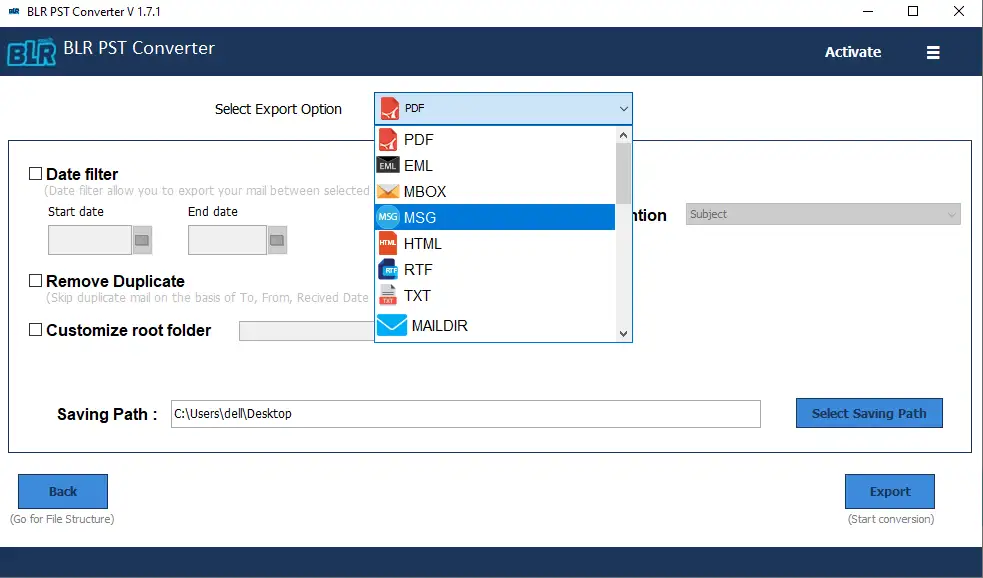
Outlook PST converter is an efficient tool to open, read, and convert PST files. With this software, you can export PST emails into various formats like PDF, EML, MSG, and HTML. Using this tool, one can also migrate a PST file to other email clients and webmail accounts without data loss.
- Convert PST file to multiple file formats, including EML, MSG, HTML, MBOX, TXT, RTF, PDF, EML & more
- Smart option to convert selective items from the PST file
- Directly export PST into Gmail, Office 365, and other webmail accounts
- Maintain email folder and sub-folder hierarchy and structure
- Preview mode to read the PST file data before conversion
- Split large PST files based on size or date into smaller, manageable files
Ideal Scenarios
Best Situations to Use BLR PST Converter
Migrate to Webmail Account
If you have a PST file and want to move it into any of your webmail accounts, then you can use Outlook PST converter Tool. The software will directly migrate PST to Office 365, Gmail, Yahoo Mail, Outlook Live, and many other email accounts.
When Outlook Not Installed
If you deleted your Outlook profile or created a new one, and want to access your PST file data, then it is not possible. However, the tool allows you to open PST file without Outlook installation.
No File Size Limit
PST file converter tool is designed to handle PST file of any size. Whether the PST file is large or small in size, this tool supports converting it without any size limit. Use the software and convert your PST file without any hassle.
From Experts
What Users Say About BLR PST Converter
I've tried a few email converter tools, and this one worked really well for me. It's easy to use, does exactly what it says, and the whole process was smooth. Definitely a good experience overall.
I needed to upload a few selected folders to my Microsoft Office 365 account, and the BLR PST Exporter made the process quick and easy. The tool worked smoothly, and the real-time support was very helpful. Thanks for the great tool and the coupon code as well.
Simple Steps to
Convert PST Emails With BLR PST Converter
Step 1: Install and run the Outlook PST Converter tool on your Windows.
Step 2: Click on the “Add File” button and locate your PST file.
Step 3: Choose the email folder that you want to convert.
Step 4: From the multiple export options, choose any file format.
Step 5: Browse the saving location and hit the Export button to start PST file conversion.
Key Features of
BLR PST Converter Software
Convert PST File to Different Formats
This PST Converter tool allows you to easily convert Outlook PST files into multiple formats. Mostly, it will preserve folder structure and data integrity while converting emails. It supports converting PST to EML, EMLX, MBOX, PDF, MSG, and many more.
Selective Folder Conversion
This PST Conversion tool allows users to convert specific folders from a PST file according to their needs. When the user adds the PST file, the tool shows the complete mailbox hierarchy. You can choose the email folder and avoid any unwanted conversion.
Preserver Structure and Hierarchy
PST Converter Software guarantees that during the conversion process, you have a complete file hierarchy and folder structure. Generally speaking, the conversion software preserves the original data formatting while converting emails.
Split Large PST File
Dealing with the oversized PST file is a challenging task, and to the extreme, it can corrupt your import data. To handle this issue and avoid the performance issues, split large PST file into smaller parts is a good measure.
Smart Preview Mode
With this tool, there is a preview mode feature that lets you view emails, attachments, and folder structures before conversion. By previewing your emails, users can quickly review the content and ensure that the correct data is selected for conversion.
File Naming Options
Saving the exported file in a recognized format makes it easier to locate later. This tool also offers various file naming options, allowing you to choose the particular format. It ensures clarity, simplifies searching, and prevents files with similar names from being overwritten.
Date Range Filters
The PST converter tool date range filter allows users to convert PST emails from a specific time period. You can choose the starting and ending date, convert relevant emails, and save time and reduce the exported file size.
PST Contact Extraction
This tool offers a specific feature to export contacts from PST file. All you need to do is add the PST file, choose the contact folder, then select VCF as an export option. After that, the software will efficiently extract contacts from PST file into .vcf files.
Delete Duplicate Emails
This tool offers an additional feature that allows users to remove duplicate emails during PST conversion. Simply add the PST file, and choose the export option. Then enable the “delete duplicate email” feature, and start the PST file conversion without repeated emails.
Convert Bulk PST Files
Convert multiple PST files at once with the PST file converter tool if you have a large number of PST files to convert to save time. Users can add a single PST file or add multiple PST files at the same time to perform bulk PST conversion.
Export PST to Office 365
Transfer emails, contacts, calendars and other mailbox items, with complete folder hierarchy and original formatting, directly into an Office 365 account. This advanced feature helps individuals as well as organizations to move to a cloud-based environment without losing any data.
Transfer Emails to Gmail
Transfer emails directly to a Gmail account with this PST file converter tool. Just enter the Gmail credentials while conversion, and the software will manage the rest. It also allows transferring emails to other web-based email clients like Yahoo Mail, AOL, Outlook.com, etc.
Retain Email Meta Properties
Outlook PST converter tool converts each mailbox item along with email meta properties like Sender, Receiver, Subject, Time, Date, Attachments, etc. It helps users to access emails with a complete structure without losing any information.
Preview Mailbox Items
The advanced features allow users to preview mailbox items like emails, contacts, calendars, tasks, etc. The original email hierarchy is maintained, preserving the original properties and formatting of emails.
Free PST Conversion
With the free trial version of PST Converter, users can evaluate the features of the software. It allows users to save 15 items from each folder to verify the results. Download the software and check the working of the tool.
System Requirements
BLR PST Converter Tool
 About Product
 System Requirement
 DocumentsAbout Product
BLR PST Converter
| Version: | 1.7.1 |
| Edition: | Personal, Business, Enterprise & Site |
| Language Supported: | English |
| Release Date: | July 2024 |
System RequirementSystem Requirement
| Processor: | Intel 4.2 GHz or i3 6th Gen 2.4 GHz or higher recommended |
| Memory: | 4 GB recommended (2 GB minimum) |
| Hard Disk: | 500 MB for installation files |
| Operating System: | Windows 11, 10, 8.1, 8 and earlier versions |
Documents Installation / Uninstallation
 User Manual
 Knowledge Base
Trial vs Full Software Comparison
BLR PST Converter Tool
| Software Features | Trial Version | Licensed Version |
|---|---|---|
| Preview PST Mailbox | ✔ | ✔ |
| Convert PST File in Bulk | ✔ | ✔ |
| Date-Range Mail Filter | ✔ | ✔ |
| Remove Duplicate Emails | ✔ | ✔ |
| Save Attachments Separately | ✔ | ✔ |
| Custom Naming Convention | ✔ | ✔ |
| Split Resultant PST File | ✔ | ✔ |
| Migrate Emails Without Attachments | ✔ | ✔ |
| Maintain Original Folder Hierarchy | ✔ | ✔ |
| Maintain Original Folder Hierarchy | ✔ | ✔ |
| Convert PST Emails | 15 items per folder | Complete |
| Free Download | Buy now |
FREQUENTLY ASKED QUESTION
Have Questions? We've Got Answers
The tool supports converting PST file into multiple formats like MBOX, PDF, MSG, HTML, EML, EMLX, and more.
Yes, you can select individual email folders to convert instead of processing the entire PST mailbox.
Yes, it retains the complete folder structure and email properties during conversion.
No, you can convert PST file without having Outlook installed on your system.
Yes, it supports PST files created by Outlook 2021, 2019, 2016, and earlier versions.
Yes, the tool can convert large PST file without limitations and without affecting data integrity.
Yes, this tool allows you to migrate PST emails to various webmail accounts, including Office 365, Exchange Server, and all other IMAP accounts.
Yes, the tool includes date range filter options to convert emails from specific time periods.
Yes, using the PST Converter tool, you can export PST contacts to VCF files.
Yes, this software will convert PST emails along with attachments.
USER PERSPECTIVE
Reviews for BLR PST Converter
Lauren Scott
18.01.2026
I needed to convert PST file into different formats for backup and sharing. Outlook PST Converter tool made the entire process simple and accurate. It converts the PST emails without affecting formatting and folder structure. A very dependable solution for email migration.
Daniel Wilson
14.01.2026
PST Converter tool worked reliably even with a large PST file and did not cause any data loss. All folders and email attributes were kept the same, which was very important for our business.